Health check utility for Windows PCs
Windows PC Health Check is a free utility tool for PC developed by Microsoft Corporation. It is one of the official Windows utilities that helps users determine whether their computer hardware is compatible with the Windows 11 operating system. It also provides information about the basic requirements needed in case they plan to upgrade to a new machine.
Top Recommended Alternative
Much like HWiNFO or HWMonitor, Windows PC Health Check can also provide system analytics that provide users with insights into how their computers are running. It can help identify possible issues that affect performance and what they can do to address and fix them.
Main feature
The app offers a variety of features to help you manage your PC's health. For Windows 11 Eligibility, if you're running Windows 10, PC Health Check provides a comprehensive eligibility check to see if your device meets the minimum system requirements. You'll get information on why your device is or isn’t eligible and what you can do if it doesn’t meet the requirements.
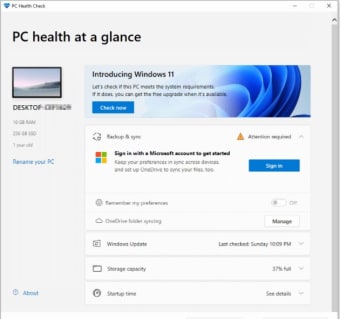
One caveat is that if you enable TPM 2.0, it may take one to two days for the system to realize you meet the requirements. There have also been reports of the app and Windows Update providing conflicting information after a BIOS firmware update. You can select Check now to see if your device can run Windows 11.
Other functions
For backup and sync, you can back up your photos and files to OneDrive to protect them and make them accessible across your devices. You can also sync your settings, such as passwords, themes, and Microsoft Edge browser settings, by signing in with your Microsoft account.
For updates, the app will let you know if your device isn't up to date or needs attention, helping you keep it running smoothly and securely. You can select Open Windows Update to go directly to Windows Update in Settings.
For battery and storage, on devices with one or two batteries, you can view a battery capacity report to see how your batteries are performing compared to their original capacity. The app also lets you see how much storage space is being used on your main drive.
For startup and specifications, you can get information on your device's startup time and what affects it and even review and change your startup programs. You can also view your device's specifications and rename your PC.
A valuable tool for PC maintenance
The PC Health Check app serves as a useful and effective tool for a quick diagnosis of your PC's performance and status. While it provides a comprehensive overview of your system's health, its features extend beyond just checking Windows 11 eligibility. The app's ability to help you manage backups, view battery capacity reports, and review startup programs makes it a valuable resource for maintaining your device.